5 strategies for better email marketing campaigns
When you follow these email marketing strategies, email will become your most important channel too!
Let's get started.
1. Personalize your messages
When we talk about personalized email marketing, we don't always mean that you should write each subscriber a unique message. Personalization entails using consumer information to produce a customized message.
AMAZON is a fantastic illustration of a business that excels in personalisation.
Amazon personalizes every email it sends out.
It reads "Dear Steven," not "Dear valued customer."
It reads "You might enjoy these... (based on my purchasing history)," not "You might like these... (randomly produced)".
Email marketing is more than just another marketing channel to Amazon. The total consumer experience depends on it.
Jeff Bezos, Amazon’s CEO is an email mastermind. Jeff Bezos understands the value of emails and has been known to read through customer complaints. It’s also why more than 35% of all product sales come from recommendations (both via email and on screen).
And it's not just Amazon that have seen these kinds of results through personalization.
A study by Experian found that personalized emails deliver 6x higher transaction rates!
Let’s break this down into numbers we can all understand:
Back in 2019, a research found that email marketing generates $0.08 in revenue per email.
That may not sound like much...
But if you send out an email campaign to 500,000 subscribers, you can generate up to $40,000 in revenue.
That's a lot of additional revenue!
But, if you use personalization in your emails, you can expect a lot more!
According to new research,
Personalization can generate $20 in ROI for every $1 invested.
What a chance for profit that is!
The best part is that customization is not used by 70% of brands in email marketing campaigns.
This means that you can separate out from the competition by personalizing your emails.
Addressing the reader by name is the simplest way to personalize. This is a feature that the majority of email service providers (ESP) have, and using it by itself will boost the effectiveness of your campaigns.
By way of illustration, email subject lines that include the first name of the receiver can boost open rates by 16%.
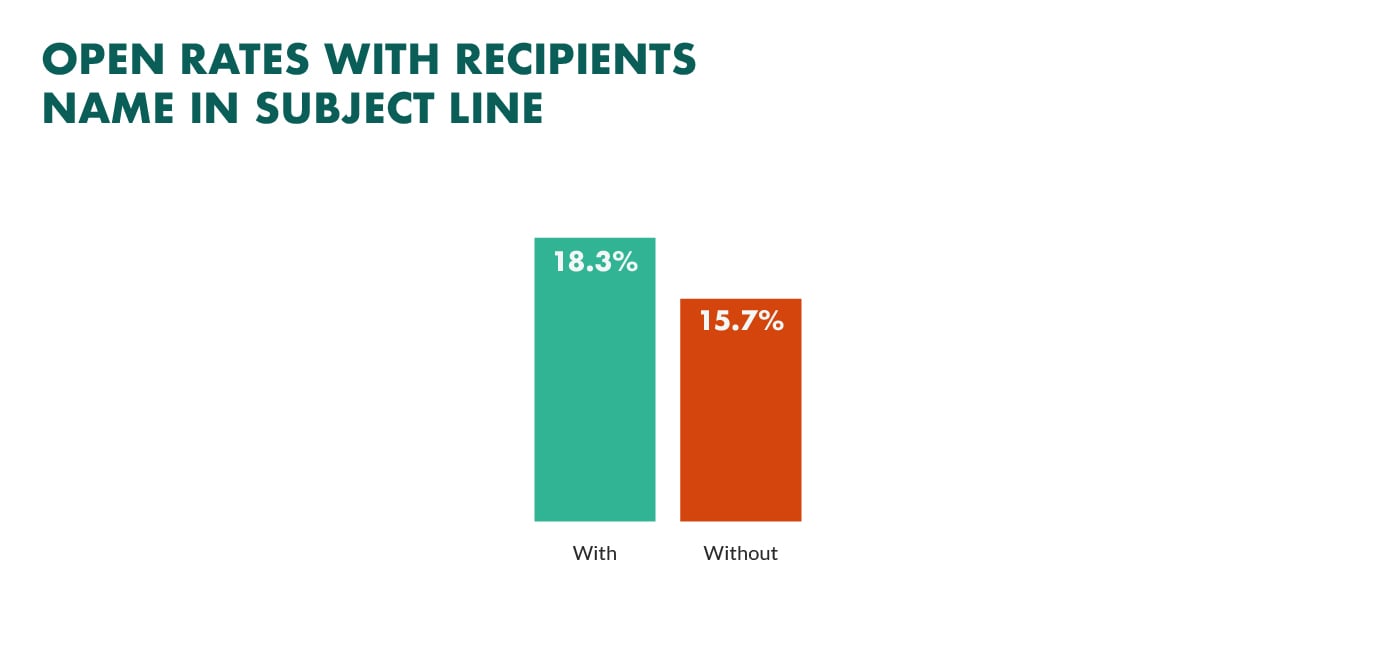
Considering that 47% of all emails are opened because of subject line alone, that’s a sure fire way to get more eyeballs on your email.
Outside of using the customer’s name, here are a few more tips to help you get started with personalization:
- Ask for the right information upfront: Great personalization starts way before you hit the ‘send’ button. It all starts with your sign up form. Without data such as name, company and location, you will be very limited with your personalized communication. Remember to only ask for the information you need, rather than the information you want. This is one of the ways that GDPR has impacted marketing teams.
- Use a real reply-to email address: When you use donotreply@example.com, it takes away the authenticity from the messaging. You want your readers to engage and respond to your campaigns. Use a real reply address will improve credibility and appear more personal.
- Use your real email signature: Just like using a real reply-to email address, you want to use real contact information within the email and the best way to do that is to include your contact details in the email signature. Giving your readers the opportunity to contact you or connect with you online is a great way to be personal and build a relationship with them.
2. Segment your subscribers
According to email marketers, segmentation is second on the top initiatives list this year.
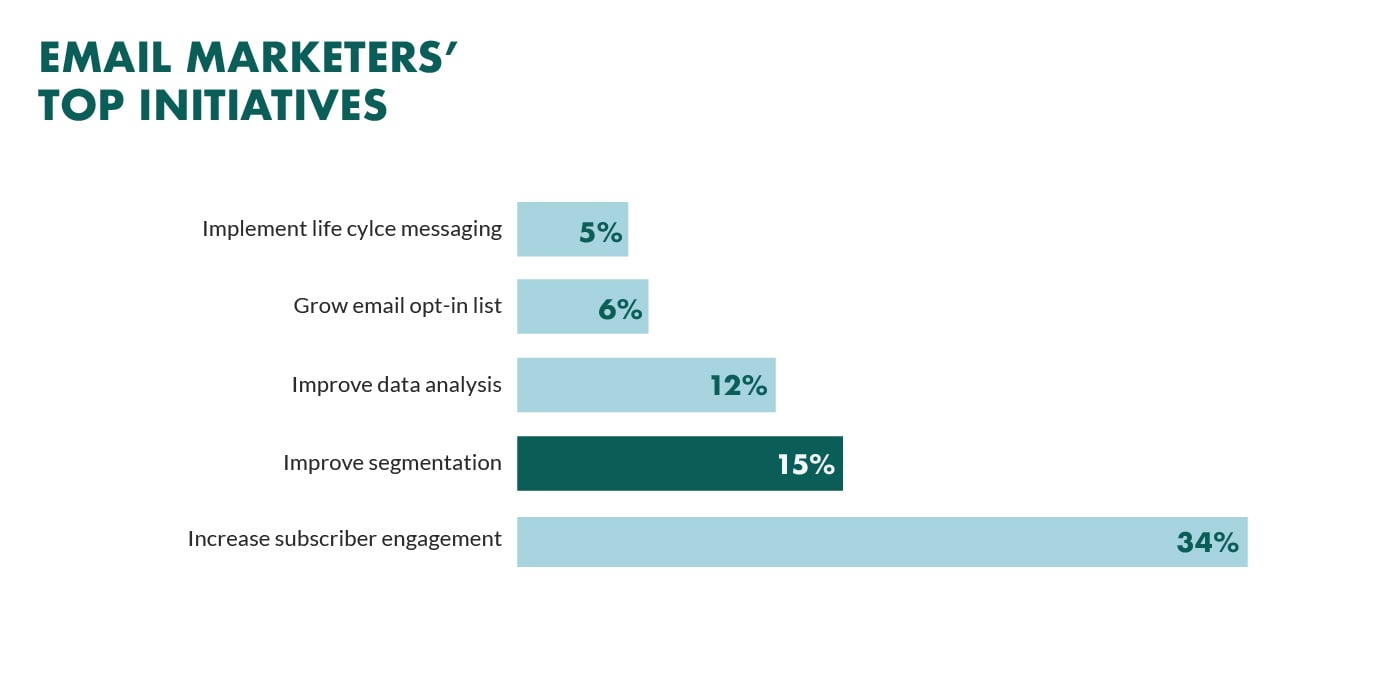
Why is it so high, do you know?
It's because segmenting your database makes your email campaigns far more audience-specific.
Let's examine a concrete illustration:
A networking event for proprietors of small businesses within a 20-mile radius is being held by you.
How can you hope for the best attendance at your event?Segmentation is the remedy.
The easiest strategy to encourage small company owners to attend your event is to build a segment of people who identify themselves as small business owners and who reside within 20 miles of it, then send them an email inviting them.
Using CRM software, segmentation is a straightforward proces
Compare this to sending one email to your entire database, with subscribers spread across the country (or continent).
How annoying is it to receive an email that invites you to an event that is located on other side of the world?
It's very annoying!
Before you start segmenting your database, let’s take a look at how valuable it can be.
A recent study found that all email marketing KPIs perform better when you segment your email list.
The segmentation results include increased performance in:
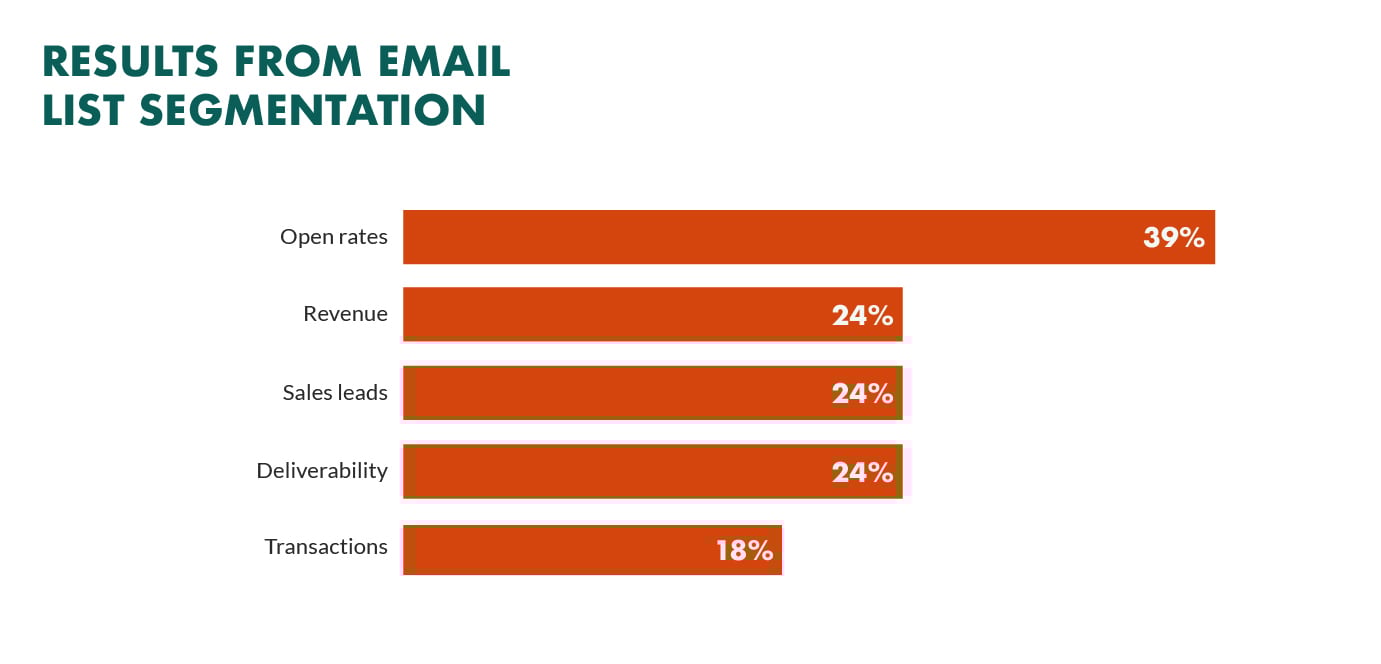 If you segment your lists, you get better open rates, revenue, leads, transactions and more customers.
Another benefit is that segmentation goes hand in hand with GDPR and email marketing.
But, does it really work?
Yes!
Here's an example from our own email marketing campaigns:
We recently sent out two email marketing campaigns. Both campaigns had the same subject line and the same content.
The first campaign was sent to our non-segmented email list, while the second was sent to our segmented list (segmented by interest).
The first non-segmented email earned an impressive 42 % open rate and a 4.5% click-through rate.
However, the segmented email campaign earned a 94% open rate and a 38% click-through rate!
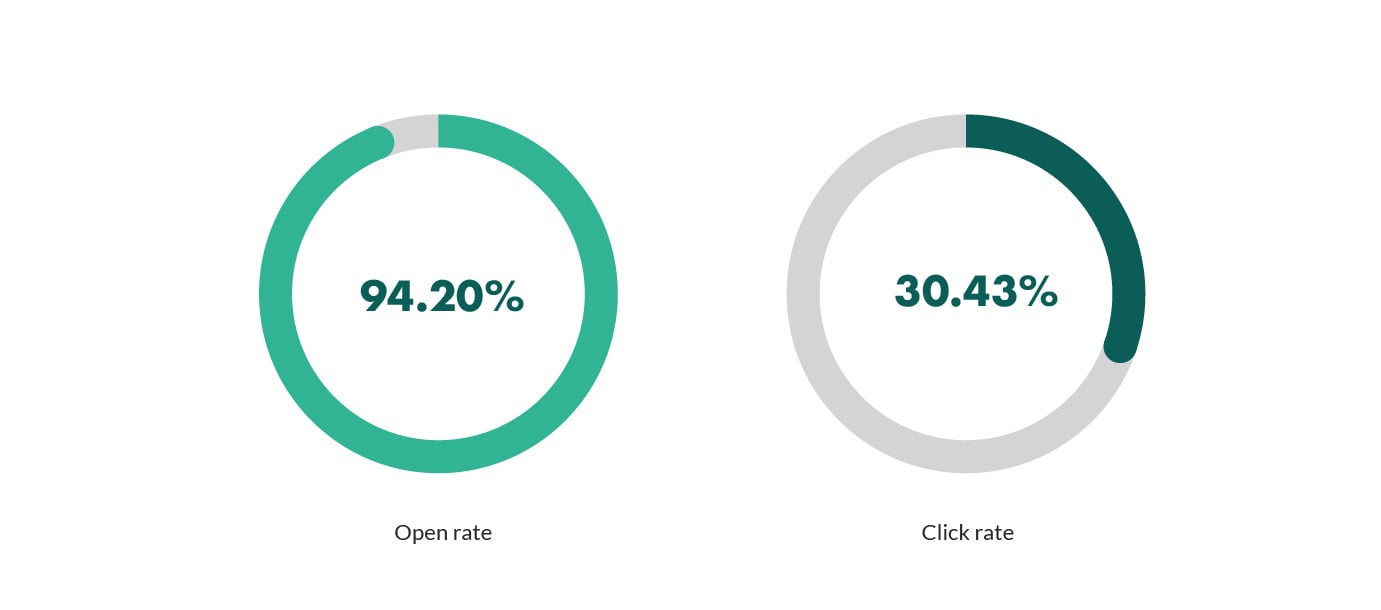 I’d say it’s pretty valuable, wouldn’t you?
And that's why so many marketers' are segmenting their emails, right?
Wrong.
As 9 out of 10 email marketers' do not segment their database.
So, here are a few examples for you to get started with segmentation:
- Segment by industry: Do you offer services and products to businesses or consumers? Knowing the industry of your subscribers is a great way to segment your email campaigns. For example, a business that sells car parts would engage at a much higher rate if they receive email campaigns on car products, compared to a business that sells software.
- Segment by company size: Also known as account-based marketing, segmenting email campaigns by company size or annual revenue is a great way to increase response rates. A small business that employs 5 people is not likely ready for the biggest industry conference of the year, whereas a business that employs 750 people might be a better fit.
- Segment by sales cycle: Early stage buyers will not be ready for an aggressive sales pitch or one-to-one demo but, they will be more appreciative to receive an industry research white paper. On the other end of the cycle, buyers who are ready to buy will respond well to product webinars or free trial offers.
3. Send mobile friendly emails
In 2012, mobile devices were used to open 27% of all marketing emails.
By 2014, that percentage had increased to 42%.
Now, it can reach 61 percent!
These statistics are enormous!
When you wake up in the morning, what do you do?
If you're anything like me, I'm thinking you keep your phone next to your bed and check it for calls, messages, and, you guessed it, emails, first thing in the morning.
You're not alone, so don't worry. 50% of us engage in this.
What do you believe the recipient does when you send an email to a subscriber who receives their emails on a mobile device but the email is not suited for that device?
Mostly, they will unsubscribe or delete it.
So why is it that almost half of all emails are still not mobile friendly?
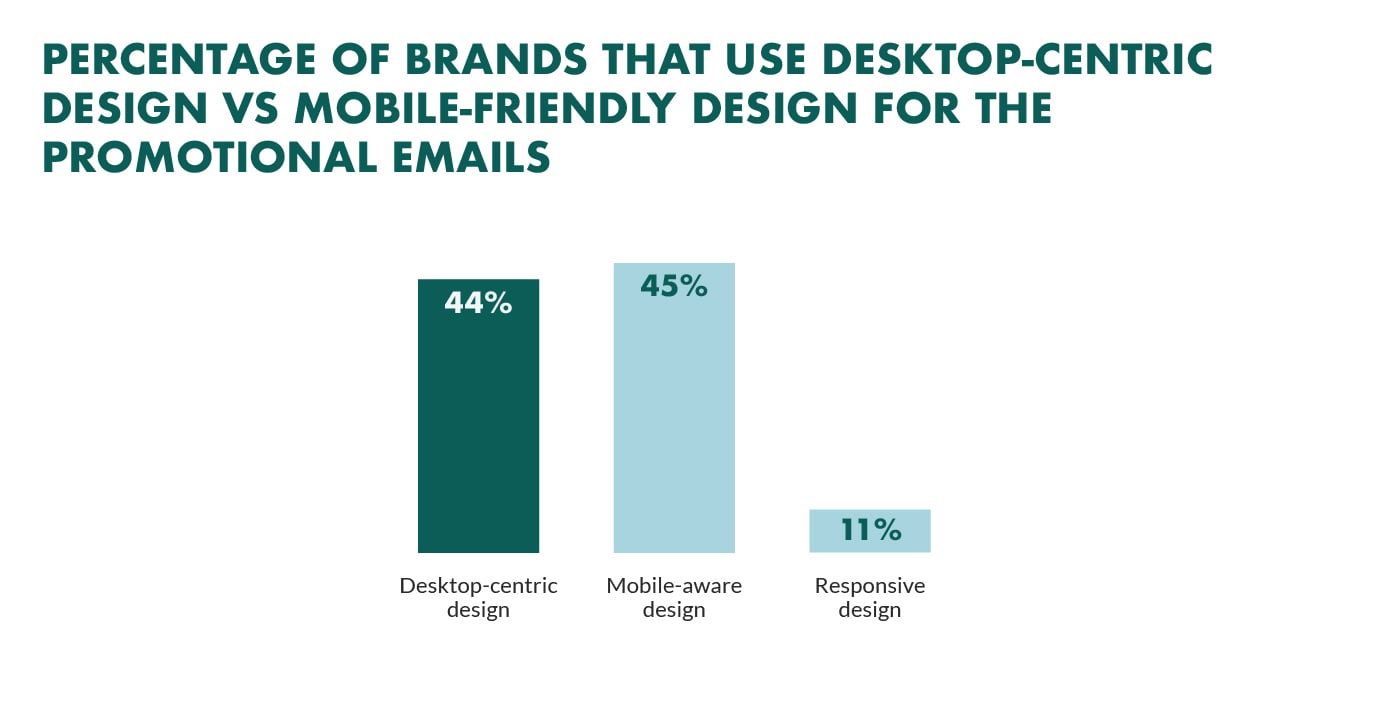 Worse still, our own email marketing research found that 20% of email campaigns are not optimized for mobile.
Yet on the opposite end of the scale, and when email campaigns are optimized for mobile, they generate a lot of revenue!
The average revenue per mobile email is $0.40, which is more than 4x that of a desktop email click, according to Yesmail.
Revenue per email on mobile devices is 4X higher than desktop
And 55% of smartphone users have made at least one purchase after receiving a mobile promotional email.
Furthermore, a study by Flexmail found that 36% of B2B companies that have optimized their email campaigns for mobile devices saw an overall improvement to their email performance.
So, how do you optimize your campaigns for mobile devices?
Don’t worry, here are some tips on how to do that.
- Use responsive email design (RED) to ensure that the user experience is optimal no matter what device or screen the recipient is using. The majority of email service providers (ESP) give this option as part of their email capabilities.
- Shorten the pre-header and subject line: The subject line has a key role. Keep it brief so the reader understands the email's topic. Don't waste the pre-header text (sometimes referred to as snippet text) by putting "To view this email in your browser..." As an alternative, offer a summary of the email or a call to action (such as, "Use "FREESHIP" to get free shipping”).
- Make the CTA clear and prominent: The sizes of mobile devices vary. Although a text link might function on a tablet or
- Make the CTA big and obvious: Mobile device vary in size. While a text link may work on a tablet or larger screen, you might be alienating your readers who have a smaller screen (or bigger hands!) if your call to action is too small. Make the call to action, big, bold and simple to click.
4. Test copy, design and buttons
Whether you test your home page, landing pages or email templates, testing provides us with data to make practical decisions that will improve our marketing performance.
And email marketing is no different.
Most marketers have A/B tested their email campaigns.
If I had to guess, I'd say you’ve tested your email subject line, right?
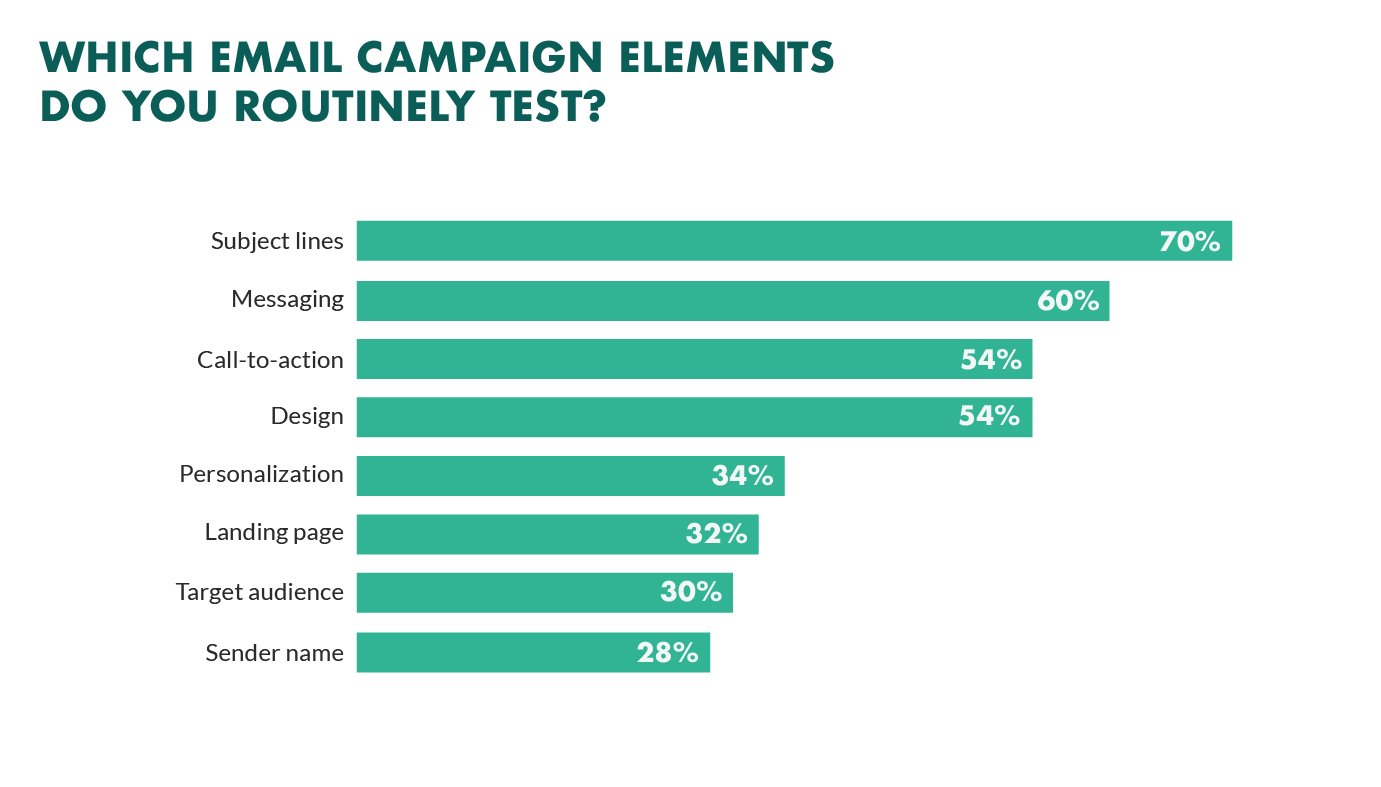 Even the former President of the United States has A/B tested his email subject lines….
Think I’m kidding?
Email marketing played a huge part in the success of Obama's 2012 Presidential campaign.
By sending several variations made to the subject line to a small sample of subscribers, they were able to calculate the amount in donations they could expect to receive based on the results.
The sample size revealed that the poorest performing subject line ("The one thing the polls got right.."), when sent to the entire database, would generate $403,603 in donations.
The best performing subject line ("I will be outspent") was expected to generate $2,540,866 in donations.
That's a huge difference!
In fact, the best performing subject line outperformed expectations and generated a total of $2,673,278.
That's an additional $2.2 million in donations raised due to a change in the emails subject line!
President Barack Obama raised an additional $2 million in donations by split testing his email subject line
But it's not only subject lines you can test through email marketing.
You can also test:
- From address: The name that appears in the “from” field has a huge impact on whether the reader opens your email. In fact, the sender name is the main reason why people open your email. Test your from address by sending your campaigns from a person’s name, person + company or from your CEO.
- Plain text vs HTML campaigns: Like most marketers’, I’m sure you are already sending a plain text version of your email. However, have you thought of testing an email campaign that is plain text only? And when you add an element of personalization, plain text emails appear to be written just for the reader.
- Long vs short emails: You can keep your emails short and sweet or, you can create long detailed emails. Long form emails can include more detailed copy whereas shorter emails will send the reader directly to a targeted landing page. The best way to see what works best? Test it.
(Not sure how to design your email campaigns? We've collected 21 of the best B2B email marketing examples from the world's leading SaaS companies.)
5. Automate email campaigns when possible
Trigger-based emails are emails that are sent out automatically based on user behavior.
The most common forms of trigger emails are ‘welcome’ emails, ‘thank you’ emails and ‘transactional’ emails, such as order confirmation email and email receipts.
The data behind trigger emails shows us that trigger emails perform much better than traditional email.
For example, Epsilon found that:
- Open rates for trigger emails are as high as 49% (95% higher than traditional email open rates)
- The average click-through rate (CTR) for trigger emails is more than double the rate compared to traditional email click-through rates
- The best converting websites in the world, sites that convert as much as 40% of their traffic, use trigger emails.
And not only that. According to the recent Blueshift Report, trigger-based marketing emails are 497% more effective than batch and blast emails.
Does this sound too good to be true?
Well, it's not. We've tested it. And it works!
Below is a comparison for our traditional email campaign (left) against our triggered email campaign (right):
Our triggered emails generated 5x higher open rates and 15x higher click-through rates.
Today, only 20% of marketers currently use triggered emails and they make up a low percentage of overall email volume, at around 2.6%. However, they can be responsible for as much as 20% of your email marketing revenue!
Triggered emails perform really well because they hit the email marketing sweet spot.
What does the email marketing sweet spot look like, you ask?
It looks like this:
And the reason why they perform so well is because of context.
Consider the following scenario;
You visit a website, browse the product line and add items to your shopping cart but, you begin to have doubts and decide to leave before completing a purchase.
Sound familiar?
This happens to every single eCommerce store, every single day.
But what if, one hour later, you receive an email that includes the exact product you were shopping for?
And what if this email included not only a quick-link back to your shopping cart but, a free shipping code or 10% discount?
You’re now more likely to complete your purchase, aren’t you?
That’s the power of trigger emails.
But setting up triggered emails is expensive and complex, isn't it?
It doesn't have to be. You can start by using auto-responders in your customer service software to replicate the automation aspect. That's what we do for all of our existing triggered emails and we're happy with it.
Here are some examples of trigger mails you can send;
- Activation: A new user creates an account but, they do not use your product within the first 7 days. Create an "activation" campaign that sends an automated email with their login information, steps on how they can get started and include a video demonstration for additional support. You can also invite them to a one-on-one meeting to walk them through the product and answer any questions they may have.
- Win-back: An existing customer is soon approaching the end of his yearly subscription. The customer hasn't used your product in 3 months and you need a way to win them back and keep them for another year. Create a "win back" email that sends an automated email to all customers that are coming to end of their contract with a list of new product features and a short plan on expected releases in the next six months
Hope u like this article👍🏼⬆️
RispondiElimina